
Growing your Instagram followers organically isn't about some secret, complicated formula. It really boils down to two things: creating awesome content that reaches new people and building a profile that makes them want to stick around. If you can get those two pieces right, you'll start attracting followers who are genuinely into what you do.
Build an Irresistible Instagram Profile
Think of your Instagram profile as your digital storefront or your business card. It’s the very first impression you make, and you have literally seconds to convince a new visitor to tap that "Follow" button. A slick, well-optimized profile is your best shot at turning a casual browser into a loyal fan.
First up, your profile picture. This is the tiny circle that represents you everywhere on the platform, so it needs to be instantly recognizable. If you’re a personal brand or creator, a clear, high-quality headshot is the way to go. For businesses, your logo is perfect. The goal is for someone to recognize you immediately, whether they see you in a search result or at the top of their Stories feed.
Craft a Bio That Converts
You’ve got 150 characters in your bio to make a big impact. This is your elevator pitch. It needs to quickly tell a new visitor:
- Who are you?
- What do you do or offer?
- Why should they care (and follow you)?
Steer clear of generic descriptions. Let's walk through a step-by-step transformation for a local bakery's bio:
- Start with the 'Boring' Version: "We sell baked goods." This is technically true, but it's uninspiring.
- Add Specificity: "Your friendly neighborhood bakery." Better, it adds a local feel.
- Inject Value & Urgency: "Fresh sourdough daily | Gluten-free treats on weekends." Now visitors know exactly what makes you special and when to visit.
- Include a Call-to-Action (CTA): "👇 Order this week's specials!" This tells people what to do next.
Final Bio: "Your friendly neighborhood bakery 🥖 Fresh sourdough daily | Gluten-free treats on weekends 👇 Order this week's specials!"
The same logic applies to a freelance photographer. Instead of "Freelance Photographer," try this: "Capturing candid moments for adventurous couples 📸 Based in the Pacific Northwest | Now booking 2025 weddings. See my work below!" Right away, you know their niche, location, and how to hire them.
Key Takeaway: Your bio isn't just a description—it's a conversion tool. Use it to show off your unique value and tell people what to do next, whether that’s visiting your website, checking out your products, or just hitting "Follow."
Turn Story Highlights Into a Mini-Website
Don't sleep on your Story Highlights. That little row of circles under your bio is prime real estate. By saving your best Stories into curated collections, you can create a sort of navigation menu for your brand. This simple step transforms your profile from a basic feed into a full-blown resource hub, giving new visitors every reason to follow you.
Here's a step-by-step tutorial on creating a "FAQ" Highlight:
- Post a "Question" Sticker to your Story: Ask, "What do you want to know about [Your Topic]?".
- Answer Each Question: Post each question with your answer on subsequent Story slides. You can use text, a short video, or a graphic.
- Create the Highlight: Once your Stories are live, go to your profile, tap the "New" circle under your bio.
- Select Your Stories: Choose all the FAQ slides you just posted.
- Name and Cover: Name the Highlight "FAQ" and choose a clean, on-brand cover image. Now, all that valuable information lives permanently on your profile.
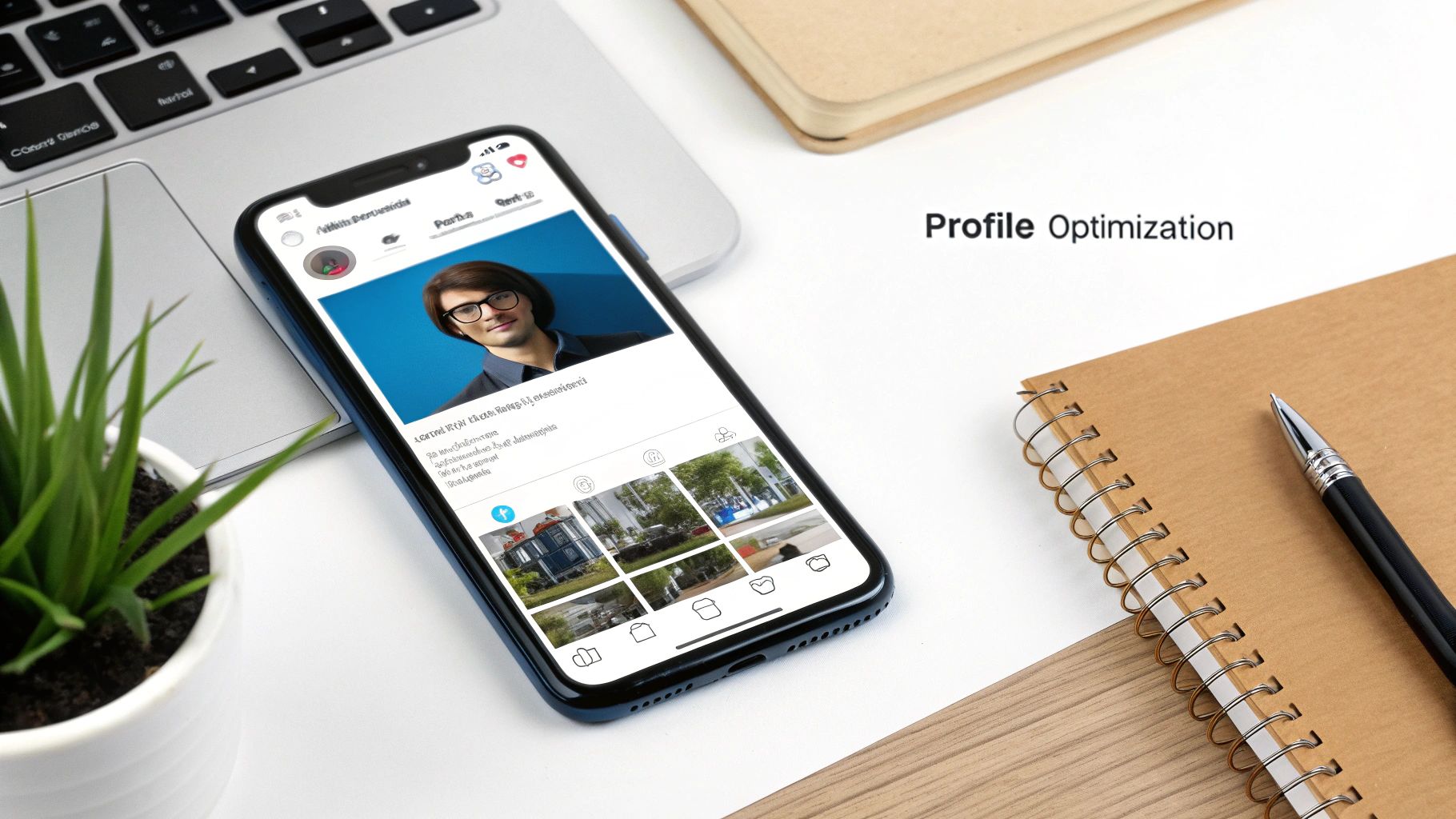
This screenshot shows how a well-structured Instagram profile instantly communicates its purpose through a clean profile picture, a punchy bio, and neat Story Highlights.
You can create Highlight albums for all kinds of essential info. Some ideas to get you started:
- About Me/Us: Introduce yourself or the team to build a real connection.
- Services/Products: Show off what you sell with clear examples and maybe even pricing. For visual guides, you might find our expert photography composition tips helpful.
- Reviews: Share screenshots of happy customers and positive feedback for some killer social proof.
- FAQ: Answer the questions you get all the time to save yourself—and your audience—some time.
Of course, none of this matters without content that people actually want to see. The Instagram algorithm rewards watch time and engagement, so you need to create stuff that grabs attention and holds it. Just look at fashion brands—they account for a whopping 25% of all brand interactions on the platform, proving how powerful niche-specific content can be. You can dig into more details on this in a recent report on Instagram's user metrics and engagement statistics on analyzify.com.
Develop a Follower-Magnet Content Strategy
An optimized profile is your welcome mat, but it’s your content that truly makes people want to stick around. If you're serious about growing your Instagram followers organically, the secret isn't just posting more—it's about consistently creating content that your ideal follower finds valuable, entertaining, or just plain inspiring. This isn’t about frantically chasing every trend. It's about building a solid content framework that works for you and resonates with your audience.
The backbone of any strong Instagram strategy is your set of core content pillars. These are the 3-5 main topics you'll talk about, time and time again. Think of them as the foundational themes of your brand.
Here’s a practical example for a fitness coach:
- Pillar 1: Workout Tutorials. Example Post: A Reel showing a 10-minute ab workout.
- Pillar 2: Healthy Recipes. Example Post: A Carousel detailing how to make a high-protein smoothie.
- Pillar 3: Mindset Motivation. Example Post: An image post with a caption about overcoming gym anxiety.
Nailing down these pillars gives your account a clear purpose. It instantly tells new visitors what you're all about, which is key to attracting followers who are genuinely interested in what you have to say.
Designing a Dynamic Content Mix
Once you know what you're going to talk about, you need to figure out how you're going to present it. Just posting single images day after day is a huge missed opportunity. Your audience has different preferences; some love the quick hit of a Reel, while others prefer to dig into a detailed Carousel. A healthy mix keeps your feed fresh and casts a wider net.
Here’s a simple, effective content mix that many brands find success with:
- Single Images (50%): Perfect for high-impact announcements, gorgeous product shots, or sharing user-generated content (UGC).
- Reels (30%): This is your best bet for reaching people who don't follow you yet. Use them for quick tips, behind-the-scenes content, or hopping on relevant trends.
- Carousels (20%): Ideal for educational content, telling a story, or creating step-by-step guides. Carousels are goldmines for getting saves—a powerful signal to the Instagram algorithm.

To make creating short-form videos less of a chore, a Reelmagic AI video generator can be a game-changer. These tools help you produce eye-catching Reels much faster, so you can focus on the ideas.
Pro Tip: Save yourself a ton of time by creating reusable templates. Hop into a tool like Canva and design a branded Carousel template with a cover slide, a few body slides, and a final slide with a call-to-action. This keeps your look consistent and streamlines your workflow.
A Practical Tutorial for Creating Engaging Content
Let's make this real. Imagine one of your content pillars is "Time Management for Freelancers" and you want to create a Reel. Remember, on Reels, the first three seconds are everything.
Here’s a step-by-step plan to create that Reel:
- Choose a Strong Hook: Let's go with the "Problem-Agitation" hook: "Still ending your workday feeling like you got nothing done? You’re probably making one of these three time-blocking mistakes." Record yourself saying this or put it as big text on the screen.
- Deliver the Value (Quickly): Use short clips or text overlays for each of the three mistakes. For example:
- Clip 1: Mistake 1: Not planning your 'Big 3' tasks first.
- Clip 2: Mistake 2: Ignoring your energy levels.
- Clip 3: Mistake 3: Letting emails derail your focus.
- End with a Call-to-Action: The final clip should tell viewers what to do next. For example: "Follow me for more daily productivity tips!"
Test out different hooks to see what your audience responds to. If you’re ever stuck in a rut, browsing a good list of social media post ideas can be a great way to get the creative juices flowing again.
Using Story Stickers for Audience Research
Your audience has all the answers—you just have to ask. Instagram Stories are more than just a place for fun, behind-the-scenes content; they're an incredibly powerful tool for market research.
Here’s a step-by-step tutorial for using the Poll sticker for research:
- Formulate a Question: Come up with a simple "A or B" question related to your content pillars. Example for a designer: "What tutorial do you want next?"
- Create the Story: Post a simple background image or a picture of your work.
- Add the Poll Sticker: Type your question into the poll. For the options, put "A) Logo Design Tips" and "B) Color Theory Basics."
- Share and Analyze: Post the Story. After 24 hours, check the results. If "Logo Design Tips" wins with 80% of the vote, you know exactly what your next high-value post should be about.
The answers you get are pure gold. These aren't just guesses; they're direct requests from the very people you want to serve. Use this feedback to build a content strategy that’s not just about attracting followers, but about building a community that trusts you.
Master Hashtags for Maximum Discoverability
Let's get one thing straight: hashtags aren't just trendy fluff you tack onto the end of your post. They're one of the most powerful discovery tools on Instagram, acting like little signposts that guide brand-new audiences straight to your content.
If you’re serious about growing your Instagram followers organically, a smart hashtag strategy is non-negotiable. It’s what gets your posts in front of the very people who are actively looking for what you offer. Forget just slapping on popular tags; what you need is a sophisticated, multi-layered approach to see real results.
I've found the most effective method is to think of hashtags in three distinct tiers. This approach helps you cast a wide net while also zeroing in on a highly relevant, engaged audience—the kind that actually hits "follow."
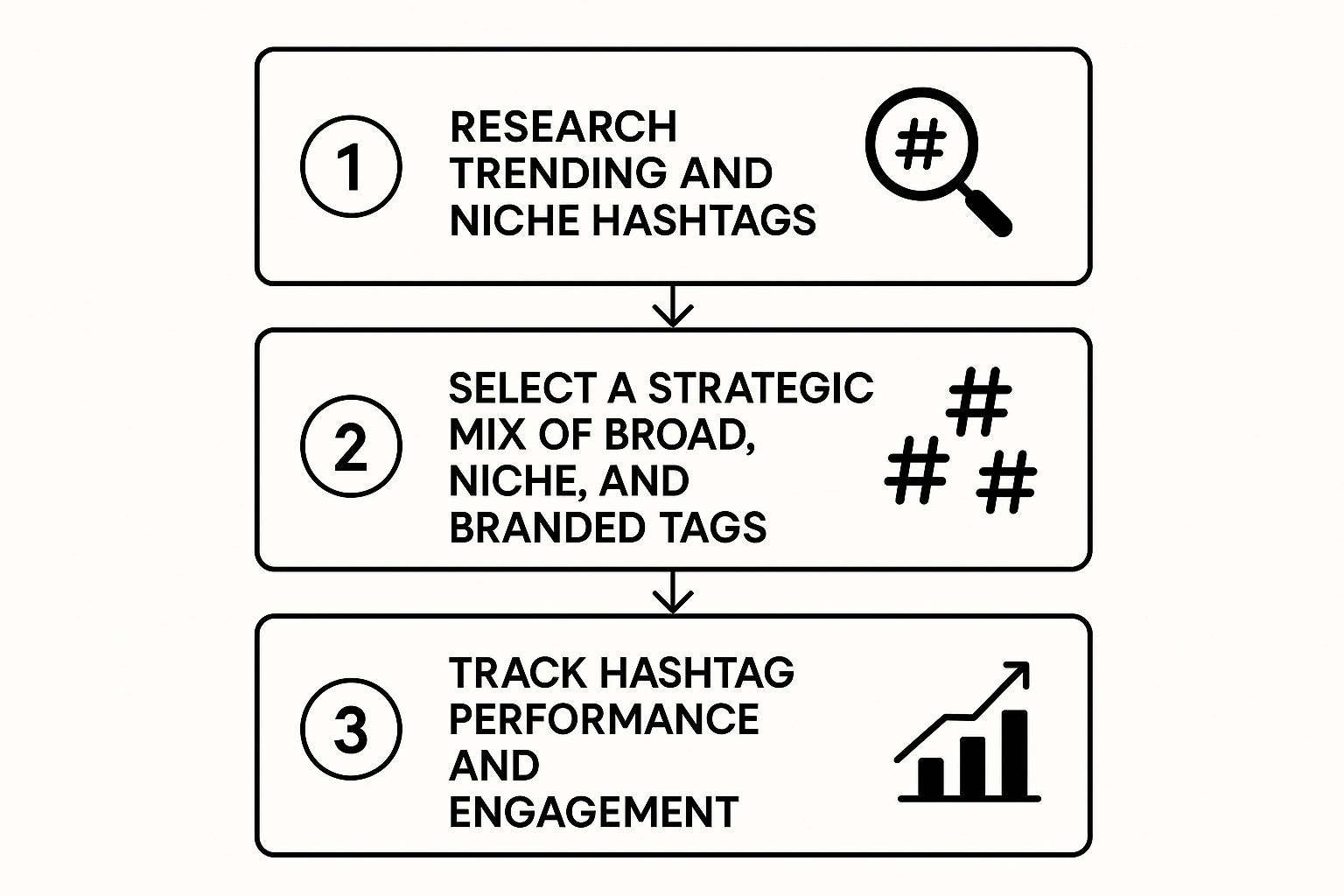
As you can see, a killer hashtag game is a constant loop: you research your tags, mix them strategically, and then analyze what worked to make your next post even better.
Build Your Hashtag Tiers
First things first, you need to get organized. Here's a quick tutorial on building a hashtag library in a Google Sheet:
- Create a New Sheet: Title it "Instagram Hashtags."
- Create Columns: Label columns for your content pillars (e.g., "Workout Tutorials," "Healthy Recipes") and your tiers ("Broad," "Community," "Niche").
- Start Researching: Use Instagram's search bar. Type "#healthyrecipes" and note the post volume. Then, look at the "Related" tags it suggests.
- Populate Your Sheet: Add hashtags to the appropriate columns. For example,
#healthyrecipes(50M+ posts) goes under "Broad."#mealprepideas(5M posts) might go under "Community."#highproteinsnack(200k posts) goes under "Niche." - Use It: For your next recipe post, copy-paste a mix of 1-2 Broad, 5-10 Community, and 10-15 Niche tags from your sheet.
Here's a breakdown of the three tiers:
- Broad Appeal Hashtags (1-2 per post): These are the juggernauts with millions of posts, like
#fashionor#digitalart. They can give you a quick, initial burst of visibility, but your post will get buried in the feed almost instantly. - Community-Focused Hashtags (5-10 per post): This is your sweet spot. These tags have a healthy volume (think 50k to 500k posts) and are used by a dedicated, passionate community. For a sustainable fashion brand, this could be something like
#slowfashionmovementor#ethicalstyle. - Niche-Specific Hashtags (10-15 per post): Get hyper-targeted here. These are lower-volume tags that describe exactly what's in your post. For a photo of a linen dress, you might use
#linendressor#sustainablefabrics. These tags attract your absolute ideal customer.
Finding and Placing Your Hashtags
So, where do you find these golden hashtags? The best place to start is by looking at what your competitors and favorite accounts in your industry are doing. Check out their top-performing posts and see which tags they’re using.
Another pro tip is to use Instagram's own search bar. Just type in a keyword, and Instagram will suggest a list of related hashtags. This is a direct line into what real users are actually searching for.
Once you have your set of hashtags ready for a post, where do they go? You've got two solid options:
- In the Caption: Placing them right at the end of your caption is clean, simple, and gets the job done.
- In the First Comment: Many creators prefer to post their block of hashtags in the first comment immediately after publishing. To do this, simply post your content, then immediately tap the comment icon and paste your hashtag block as the first comment. This keeps the caption looking uncluttered. Both methods are equally effective.
And don't forget location tags! If you're a local business, tagging your city, neighborhood, or even the specific coffee shop you're in is an absolute must for attracting a local following.
Understanding a bit about global user data can also give you an edge. Instagram now has 2.6 billion global users, with massive markets like India boasting over 550 million users. If your content has international appeal, tapping into these markets can fast-track your growth. You can dive deeper into these global user trends in a detailed report from SQ Magazine.
Fuel Growth with Authentic Community Engagement
Look, creating great content is a huge piece of the puzzle, but it's only half the battle. If you're serious about growing your Instagram followers organically, the real magic happens when you roll up your sleeves and actually engage with your community.
Organic growth isn't something that just happens to you; it's a conversation you start. Simply double-tapping a few posts and calling it a day won't get you noticed. You have to show up, provide value beyond your own feed, and give people a real reason to care about who you are and what you do.

Adopt a Daily Engagement Routine
Meaningful interaction doesn't have to eat up your entire day. In fact, you can make a surprisingly big impact in just 15 minutes. Committing to a short, focused engagement routine is one of the smartest ways to build momentum.
Here’s a practical, 15-minute daily routine you can follow:
- (0-5 mins) Respond to Everyone: Open your notifications and DMs. Go through every new comment and message and reply. This shows your current followers you’re listening.
- (5-10 mins) Engage with Hashtags: Pick one of your key "Community" hashtags (e.g.,
#slowfashionmovement). Tap on the "Recent" tab. Scroll through the new posts and leave 5-10 thoughtful comments. - (10-15 mins) Interact with Similar Accounts: Go to the profile of a non-competing peer in your space. Watch their latest Story and reply to it, or leave a meaningful comment on their newest post.
This consistent, proactive approach gets your name in front of hundreds of potential new followers every single week. It works.
The Power of Thoughtful Commenting
Let's be real: a "like" is fleeting, but a great comment starts a real conversation. Leaving meaningful comments on other accounts in your niche is a powerful—and seriously underused—strategy for organic growth.
Here's a step-by-step tutorial on leaving a comment that gets you noticed. Imagine you're a nutrition coach and a food blogger posts a recipe:
- Read the Caption: Understand the context. They're excited about a new healthy breakfast bowl.
- Find a Specific Detail: Notice they used Greek yogurt.
- Add Value or Ask a Question: Instead of "Looks delicious! 😋", write: "This looks amazing! I love that you used Greek yogurt for extra protein. I bet a sprinkle of cinnamon would take it to the next level too. Great recipe!"
See the difference? The second comment shows you know your stuff, adds to the conversation, and makes other users curious enough to tap on your profile. You instantly go from being a passive scroller to an active community contributor. To really make your own profile pop when they click over, think about using different visual storytelling techniques.
Key Insight: The goal isn't just to get a reply from the creator. It's to spark curiosity in everyone else reading the comments. Think of each comment as a mini-advertisement for your expertise and personality.
Turn Followers Into Your Marketing Team with UGC
One of the most powerful forms of engagement is User-Generated Content (UGC). When your followers post about your brand, it acts as incredible social proof—far more believable than any ad you could run.
Here's a tutorial for launching a simple UGC campaign:
- Create a Branded Hashtag: Make it unique and easy to remember. A local coffee shop could use
#MyCozyCupMoment. - Announce the Campaign: Create a post explaining the hashtag. Announce a small incentive, like, "Use #MyCozyCupMoment to be featured on our page! We'll pick one winner each month for a free coffee and pastry."
- Promote It: Add the hashtag to your bio. Mention it in your Stories.
- Engage & Share: When someone uses your hashtag, like and comment on their post immediately. Ask for permission to reshare their photo to your feed or Stories, always giving them credit.
This simple strategy builds a content library, increases reach, and strengthens your community.
Weekly Organic Engagement Checklist
This simple checklist helps you stay consistent with the activities that drive real, organic follower growth day in and day out.
| Activity | Daily Goal | Weekly Goal | Purpose |
|---|---|---|---|
| Reply to Comments & DMs | All new | 100% | Nurture existing community & boost post engagement |
| Comment on Hashtag Posts | 5-10 thoughtful comments | 35-70 comments | Increase visibility in your niche & attract new followers |
| Engage with Peer Accounts | 3-5 accounts | 20-35 accounts | Build relationships & get seen by relevant audiences |
| Share User-Generated Content | As it appears | 1-2 shares/week | Provide social proof & make followers feel valued |
| Respond to Story Mentions | All new | 100% | Strengthen one-on-one connections & encourage more tags |
By following this routine, you’re not just "doing" engagement; you're strategically building a community that wants to grow with you.
Authentic community management is more important than ever. While Instagram's user base is growing, some data shows overall engagement has seen a 28% year-over-year decline thanks to fierce competition and algorithm shifts. This just highlights the need for quality, meaningful interactions over chasing empty metrics. Beyond public comments, don't overlook your DMs. Using smart Instagram Direct Message automation strategies can help you build stronger connections at scale.
Use Analytics to Refine Your Growth Strategy
Posting great content and engaging with your community are huge pieces of the puzzle, but if you're just guessing what works, you’re leaving a ton of growth on the table.
The most successful accounts don't just post and pray. They make data-driven decisions that consistently speed up their growth. This is exactly how you stop spinning your wheels and start making real, measurable progress. Your Instagram Insights are a roadmap to what your audience truly wants.
The Metrics That Matter for Follower Growth
Forget about vanity metrics like likes. What you really need to track are the metrics that show your content is reaching people who don't already follow you.
Here are the big three to keep your eyes on:
- Reach: This tells you the unique number of accounts that saw your post. High reach is a fantastic sign that your content is breaking out of your existing follower bubble.
- Shares: When someone shares your post to their Story or sends it in a DM, they're basically giving you a personal recommendation. It’s one of the strongest signals of high-quality, valuable content.
- Saves: A save is a powerful indicator. It means your content is so useful or inspiring that someone wants to come back to it later. The algorithm absolutely loves this, flagging your content as high-value.
To really get this down to a science and ensure you keep growing, it’s worth mastering understanding social media analytics for growth.
Expert Takeaway: Social media consultant Katie McKeever puts it perfectly: "Instagram isn't hiding what gets you followers. If you go to the insights under any piece of content, there is a line that tells you how many followers you gained because of that specific post. Learn from this."
Conduct a Monthly Content Audit
To put all this into practice, set aside a little time each month for a simple content audit. This isn't some complex, scary process—it's just a quick review to find your winners and losers.
Here’s a step-by-step tutorial for your monthly audit:
- Go to Insights: On your profile, tap "Professional Dashboard," then "Account insights."
- Review Content: Go to the "Content You Shared" section. Set the time frame to "Last 30 days."
- Filter by Reach: Tap the "Reach" filter at the top. Note your top 2-3 posts. What are they about? What format are they (Reel, Carousel)?
- Filter by Shares: Now, do the exact same thing, but filter by "Shares." Note the top posts.
- Filter by Saves: Finally, filter by "Saves." Note these top performers.
- Find the Pattern: Look at the handful of posts that appeared repeatedly across these lists. That is your winning content formula. Was it a tutorial? A behind-the-scenes look? Double down on that style and topic next month.
This simple monthly habit gives you cold, hard data on what resonates with a wider audience.
Test, Learn, and Double Down
Analytics also gives you the power to run simple experiments—think of them as mini A/B tests—to learn what your specific audience prefers. This takes all the guesswork out of content creation.
Here is a step-by-step guide to testing two Reel styles:
- Form a Hypothesis: "My audience will engage more with a 'talking head' Reel than a faceless Reel with a voiceover."
- Create Both Versions: Record two Reels on a similar topic.
- Test A: A "talking head" Reel where you speak directly to the camera.
- Test B: A faceless Reel that uses text on screen and a voiceover.
- Post at Similar Times: Post Reel A on Tuesday at 9 AM. Post Reel B on Thursday at 9 AM. (Use different days to avoid audience fatigue).
- Analyze the Results: After 72 hours for each, go into the insights for both Reels. Compare Reach, Shares, and Saves. Which one performed better? The data gives you a clear winner.
This data-backed approach is the secret to building a refined content strategy that consistently brings in new followers.
Got questions about growing your Instagram? You're not alone. When you're trying to build something real and organic, a lot of the same roadblocks and questions tend to pop up. Let's tackle some of the most common ones I hear from creators and brands.
How Long Does It Take to Get 1,000 Followers Organically?
This is the classic question, but the truth is, there's no magic timeline. Hitting your first 1,000 followers really hinges on your niche, content quality, consistency, and engagement efforts.
For an account that’s consistently putting out great content multiple times a week and actively engaging with its community every day, you could be looking at anywhere from a few months to a year. If you're in a super competitive space, it might take a bit longer than if you've found a unique, underserved corner of Instagram.
The Real Goal: Forget the clock. Focus on your inputs instead of the follower count. Sustainable growth comes from building a community that actually cares, not just hitting a number.
A much better way to look at it is to set process-based goals you can actually control. Here’s a tutorial for setting actionable goals:
- Content Goal: Open your calendar. Schedule specific content creation blocks. Example: "Every Monday 9-10 AM: Plan this week's Reel and Carousel."
- Engagement Goal: Set a daily recurring 15-minute appointment in your calendar labeled "Instagram Engagement." During this time, you will only do the 15-minute routine mentioned earlier.
- Community Goal: Create a habit of checking your DMs and comments at the start and end of your workday, aiming to reply within 24 hours.
Nail these things consistently, and the follower growth will take care of itself.
Reels or Carousels: Which is Better for Growth?
Don't pick one. The best strategy uses both, because they serve completely different purposes. Think of them as a one-two punch for your growth plan.
Reels are for Discovery. Reels are, without a doubt, your best bet for reaching people who have no idea who you are yet. The algorithm is built to push them far and wide on the Reels feed and Explore page. They’re perfect for:
- Quick, attention-grabbing tips.
- Showing off your personality or telling a brand story.
- Hopping on relevant trends to get a quick visibility boost.
Carousels are for Nurturing. Carousels, on the other hand, are where you build a real relationship with your audience. They are absolute gold for getting saves, which is a huge signal to the algorithm that your content is valuable. Use them for:
- Step-by-step tutorials and in-depth guides.
- Telling a more detailed story or sharing a case study.
- Breaking down a complex topic into easy-to-digest slides.
Let's imagine a fictional houseplant account, @UrbanJungleGems, puts this into practice:
- Attract with a Reel: They post a quick 15-second Reel: "One Mistake That's Killing Your Fiddle Leaf Fig." It's fast, solves a common pain point, and gets pushed out to thousands of plant lovers who don't follow them.
- Nurture with a Carousel: A couple of days later, they follow up with a 10-slide Carousel: "The Ultimate Fiddle Leaf Fig Care Guide." It covers everything—watering, light, soil, common issues. Those new people who found them from the Reel are very likely to save this super-helpful guide for later, solidifying their reason to follow.
See how it works? Reels bring them in the door, and Carousels convince them to stick around.
Can I Really Grow on Instagram Without Showing My Face?
Yes, absolutely. "Faceless" accounts can see massive success in all sorts of niches, from art and cooking to finance and design. The trick isn't to hide; it's to build such a strong and recognizable brand identity that it becomes the face of your account.
If you go the faceless route, you have to be incredibly intentional about consistency.
Here's a step-by-step tutorial for building a powerful faceless brand:
- Create a Brand Kit: In a tool like Canva, define your brand. Choose 2-3 primary colors, 2 specific fonts (one for headings, one for body text), and your logo. Use these on every single post.
- Define Your Brand Voice: Write down 3-5 adjectives that describe your brand's personality (e.g., "Witty, Informative, Minimalist"). Read these before you write any caption or reply to a comment.
- Choose a Signature Content Style: Decide on your primary format. Will you be known for beautiful aesthetic flat lays? Super-detailed screen-recorded tutorials? Elegantly designed text-based carousels? Master one style.
- Launch a UGC Campaign: Actively encourage followers to share photos related to your brand (see the UGC tutorial in the engagement section). Reposting this content builds community and provides social proof without you needing to be on camera.
By doubling down in these areas, you can create a brand that’s just as magnetic and memorable as any personal one.
Ready to create stunning visuals for your Instagram, even without showing your face? With AI Photo HQ, you can generate high-quality, unique images in seconds. From custom avatars to professional-grade product shots, our platform gives you endless creative power to build a brand that stands out. Start creating with AI Photo HQ today!


