
Think of getting good results from AI like having a conversation. If you’re vague and unclear, you get a confusing answer. But if you give clear, detailed instructions, you get exactly what you were hoping for.
It's all about telling the AI what to do, giving it enough background on the task, defining the personality it should use, and even specifying how you want the final result formatted.
The Art of Asking AI the Right Questions
Welcome to what I believe is the single most important skill for professionals today. Learning how to write AI prompts isn't just for coders or tech wizards anymore. It's a fundamental skill for anyone who wants to get more done and be more creative. This guide is designed to cut through the noise and show you why the quality of what you put in directly dictates the quality of what you get out.
When you master the "language" of AI, you gain a serious edge. You're no longer just using a tool; you're collaborating with a brilliant assistant who’s ready to execute on your vision—as long as you know how to ask.
Why Your Prompts Matter More Than Ever
The ability to give precise instructions to an AI is fast becoming a globally recognized skill, largely because AI tools are showing up in every corner of the professional world. The trend is undeniable: what was once a niche technical ability is now a mainstream business necessity.
The numbers don't lie. Projections for 2025 suggest that around 80% of bloggers and over 70% of organizations in major markets have already woven AI writing tools into their daily work. The United States is at the forefront of this shift, with 78% of organizations using AI for content and a staggering 70 million monthly active ChatGPT users.
This isn't just a fleeting trend. This data, which you can dig into further in these AI writing statistics at AllAboutAI.com, shows just how critical it is to get good at prompting if you want to collaborate effectively with AI.
The Shift from User to Director
The core idea is simple but powerful: better prompts get you better results. Period. When you learn to write AI prompts with precision, you stop being a passive user and become an active director of the AI's output. Instead of getting generic, watered-down content, you start receiving responses that are perfectly tailored to your specific needs.
Let's walk through a step-by-step example.
Goal: Get some ideas for marketing a new product.
Step 1: The Vague Prompt (What most people do)
You start with a simple idea.
"Write about marketing."
Result: You'll get a generic, textbook-like definition of marketing. It's not wrong, but it's completely useless for your specific goal.
Step 2: The Directed Prompt (The better way)
Now, let's give the AI clear guardrails and a specific goal.
"Create a blog post outline on content marketing strategies for small e-commerce businesses. Focus on low-budget tactics and write in a friendly, encouraging tone."
Result: The AI will now generate a structured outline with sections like "Leveraging User-Generated Content," "Starting a Niche Blog," and "Email Marketing Basics," all tailored for small businesses with limited budgets.
This guide will give you the framework to get these kinds of targeted results every single time.
The Building Blocks of a Powerful Prompt

Think of a good AI prompt less like a simple question and more like a detailed creative brief. The magic leap from a vague request to a sharp directive that nails exactly what you need is all in the structure. If you want to master how to write AI prompts, you have to use a framework.
To get past one-line requests that yield generic junk, you need a system. I've found a simple, four-part structure works for almost every prompt I write: Task, Context, Persona, and Format (TCPF). It’s my go-to method for giving the AI everything it needs to understand not just what I want, but how and why I want it.
Let's build a powerful prompt step-by-step using this framework. Our Goal: Get a professional-sounding, bulleted list of the benefits of remote work to convince company leadership.
Define the Core Task
First, what do you want the AI to do? This is the most direct part of your prompt. Be explicit and lead with a strong action verb like write, summarize, analyze, translate, or generate. Nailing down this core action is your starting point.
- Step 1 (Task): We'll start with our basic action.
Write about the benefits of remote work.
This is a weak start, but it's the foundation we will build upon.
Provide Essential Context
Context is the "who," "what," and "why" behind your request. It’s the single biggest thing that separates a mediocre prompt from a truly great one. Good context answers questions like: Who is the audience? What is the main goal? What key points must be included?
- Step 2 (Add Context): Let's add the crucial background information.
Write about the benefits of remote work **for a B2B software company trying to improve employee retention. The goal is to create content for our internal company blog to show leadership the value of a permanent remote-first policy.**
Now the AI understands the audience (leadership), the purpose (boosting retention), and the angle to take.
Assign a Persona
A persona tells the AI who to be, dictating the tone, style, and voice. If you skip this, most AI models default to a bland, robotic voice. Get specific: "Act as a seasoned tech journalist" or "Adopt the persona of an enthusiastic career coach."
- Step 3 (Add Persona): Now, let's tell the AI who to be.
**Act as an experienced HR strategist presenting a case to the executive team.** Write about the benefits of remote work for a B2B software company...
Now the AI knows it needs to sound professional, persuasive, and data-driven.
Specify the Desired Format
Finally, tell the AI how you want the information presented. Don't leave the structure to chance. Do you need a paragraph, a bulleted list, a table, or an email draft? Being clear about format avoids a massive wall of text when you wanted scannable points.
- Step 4 (Add Format): Let's define the final output structure.
Act as an experienced HR strategist... Write about the benefits of remote work... **Structure your response as a concise, 5-point bulleted list. Each point should be a key benefit, followed by a 1-2 sentence explanation.**
This final, powerful prompt is airtight. By building it step-by-step, you turn prompting from a game of chance into a reliable process.
Mastering Specificity to Get Exactly What You Want
If you've ever felt that twinge of frustration after an AI gives you a generic or wrong response, the problem wasn't the tool. It was the prompt. Moving from a passive user to an active director means learning to layer in details with surgical precision. This is how you transform a vague idea into a direct command.
Vague prompts are a gamble; specific prompts are an investment. You are guiding the AI toward the exact outcome you have in your head. It’s the difference between telling a chef to "make some food" versus requesting "a medium-rare ribeye steak with a side of garlic mashed potatoes, hold the asparagus."
Think of yourself as a director briefing your talent. You need to provide all the necessary details for a stellar performance. This means going beyond just the task and including things like tone of voice, target audience, desired length, and even what to avoid.
Layering Details for Pinpoint Accuracy
A critical part of writing effective AI prompts is accepting that these models can't read your mind. They only have the text you provide to work with. A 2023 guide from Workiva really drives this home, highlighting that clear, detailed prompts are essential for minimizing ambiguity.
Consider these crucial layers of specificity:
- Tone of Voice: Don't just say "friendly." Be more specific: "professional yet approachable," or "energetic and motivational."
- Target Audience: Who is this for? Content for "tech-savvy early adopters" is different than for "retirees new to technology."
- Desired Length: Be concrete. Instead of "a short summary," ask for "a three-sentence summary" or "a blog post of approximately 800 words."
- Negative Constraints: Telling the AI what not to do is just as powerful. Use instructions like "do not use industry jargon" or "avoid mentioning our competitors."
The infographic below really visualizes how all these different elements of specificity contribute to a prompt's success.
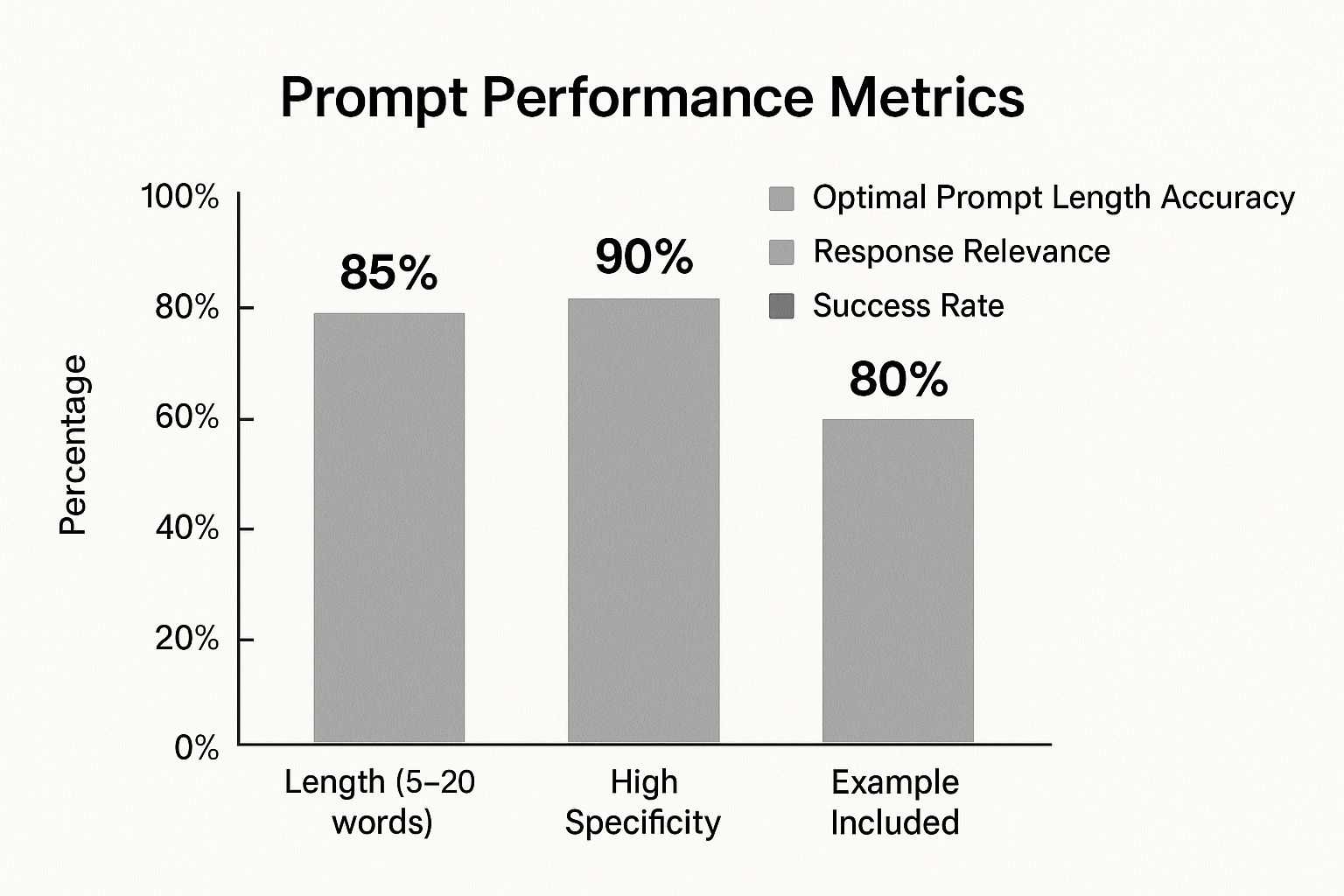
The data speaks for itself. Prompts with high specificity achieve a staggering 90% relevance rate, proving the direct impact of detailed instructions on the quality of the AI's response.
From Vague Ideas to Effective Commands
The best way to grasp the power of specificity is to see it in action. Let's walk through a tutorial for creating a product description.
Goal: Write a compelling product description for a new coffee maker.
Step 1: The Vague Prompt (Low-Effort)
Write a description for a coffee maker.
Result: You get a boring, generic paragraph about making coffee that could apply to any machine.
Step 2: Add Product Details (Better)
Write a product description for the "AromaBrew X1" coffee maker. It has a 12-cup capacity, programmable timer, and stainless steel finish.
Result: The description is now accurate but still lacks personality and a target audience.
Step 3: Add Tone and Audience (Much Better)
Write a product description for the "AromaBrew X1"... The tone should be persuasive but sophisticated, targeting busy professionals who value convenience and quality.
Result: The language becomes more elevated and focuses on benefits like saving time and enjoying a premium experience.
Step 4: Add Format and Length (Excellent)
Write a **150-word** product description for the "AromaBrew X1"... The tone should be persuasive but sophisticated... **Format as two short paragraphs with a final bulleted list of key features.**
Result: You now get a perfectly structured, persuasive, and targeted description ready for an e-commerce page.
Vague Prompts vs. Specific Prompts: A Practical Comparison
| Use Case | Ineffective Vague Prompt | Effective Specific Prompt |
|---|---|---|
| Email Marketing | Write an email to customers. | Write a promotional email for our "Spring Sale" campaign. The tone should be upbeat and urgent. Target audience is returning customers. Subject line must be under 50 characters and include an emoji. Do not mention specific discount percentages; instead, focus on "massive savings." |
| Social Media Post | Create an Instagram post about our new feature. | Generate an Instagram caption for the launch of our app's new "AI Photo Restoration" feature. The persona is a tech enthusiast excited about innovation. Include a question to boost engagement and suggest 3 relevant hashtags like #AIrestoration and #photomagic. The caption should be around 50 words. |
| Blog Post Idea | Give me blog ideas for my business. | I run a B2C e-commerce store selling sustainable home goods. Generate 5 blog post ideas for our target audience of environmentally-conscious millennials. The ideas should focus on practical tips for a zero-waste lifestyle and be written in an inspiring, community-focused tone. |
| Product Description | Write a description for a coffee maker. | Write a 150-word product description for the "AromaBrew X1" coffee maker. Highlight its 12-cup capacity, programmable timer, and stainless steel finish. The tone should be persuasive but sophisticated, targeting busy professionals who value convenience and quality. Format as two short paragraphs with a final bulleted list of key features. |
This hands-on approach is what will elevate your ability to write AI prompts that actually work.
Getting More From Your AI with Advanced Prompting
Once you've got the basics down, you'll run into tasks that demand more finesse. This is where you graduate from simply asking questions to strategically guiding the AI. Learning these advanced strategies for how to write AI prompts is what separates basic users from power users.
Chain-of-Thought: Forcing the AI to "Show Its Work"
Chain-of-Thought (CoT) prompting tells the AI to "think step-by-step" before it gives an answer. This forces the model to break a big problem into smaller, logical chunks, which seriously cuts down on errors and improves its reasoning.
Practical Tutorial: Market Analysis Goal: Decide if entering a new market is a good idea.
Step 1: The Simple (Bad) Prompt
"Is entering the market for eco-friendly pet toys a good idea for my small e-commerce business?"
This will likely get you a vague, non-committal answer.
Step 2: The Chain-of-Thought (Good) Prompt
"Analyze whether my small e-commerce business should enter the market for eco-friendly pet toys. **Think step-by-step.** First, identify key market trends for sustainable consumer goods. Second, analyze the current competition. Third, list potential pros and cons for a small business. Finally, provide a concluding recommendation based on your analysis."
Result: The AI is forced to follow a logical path, giving you a well-reasoned analysis covering trends, competitors, and specific pros/cons, leading to a much more useful recommendation.
Zero-Shot and Few-Shot Prompting: Teaching on the Fly
What happens when you need the AI to follow a very specific style it doesn’t know? This is where Zero-shot and Few-shot prompting come in handy. It’s all about giving the AI examples inside the prompt.
- Zero-Shot Prompting: You ask the AI to do a new task without any examples.
- Few-Shot Prompting: You give the AI a couple of examples (the "shots") to show it the pattern you want it to copy.
Practical Tutorial: Classifying Customer Feedback Goal: Categorize customer support tickets into "Urgent," "Technical Issue," or "General Inquiry."
Step 1: The Zero-Shot Gamble
Classify this ticket: "My password reset link isn't working and I can't log in!"
The AI might get it right, but it's a guess.
Step 2: The Few-Shot Guarantee
Here, you provide a clear blueprint for the AI to follow.
Classify the following customer tickets into one of three categories: Urgent, Technical Issue, General Inquiry.
Ticket: "I can't access my account before my big presentation tomorrow!"
Category: Urgent
Ticket: "I was wondering what your holiday hours are."
Category: General Inquiry
Ticket: "The 'Export to PDF' button is greyed out."
Category: Technical Issue
Ticket: "My password reset link isn't working and I can't log in!"
Category:
Result: By providing clear examples, you've taught the AI your exact classification rules, ensuring a highly accurate and consistent response.
The Real Skill: Iteration and Refinement
The most important skill in prompting is simply iterating. Your first prompt is almost never your best one. Treat it as a conversation starter. The AI’s response gives you feedback on what was missing. Use that feedback to refine your instructions.
For example, asking for "social media post ideas" gets you generic junk. A better follow-up is: "That's too broad. Now, give me 5 Instagram post ideas for a brand that sells minimalist jewelry. The tone should be elegant and serene. Include a call-to-action to visit our online shop."
This back-and-forth is how you truly master writing AI prompts. Once you’ve got a handle on these techniques, you can use them with the top AI content creation tools and start producing impressive work at scale.
Common Prompting Mistakes and How to Fix Them
Even with a good plan, it’s easy to make small mistakes that derail an AI. If you’ve ever stared at a response and thought, "How did it get that from what I asked?"—you're not alone. Most of these weird results boil down to a few common blunders that are surprisingly easy to fix.
The Ambiguity Trap and How to Escape It
The single biggest mistake is being too vague. Ambiguity is kryptonite for AI. A prompt that seems clear to you can be confusing to the model.
Step-by-Step Fix: Brainstorming Slogans
The Flawed Prompt:
Give me a slogan for my coffee.- Problem: The AI knows nothing about your coffee, your customers, or your brand voice. The results will be generic.
- Example Output: "Coffee, Your Daily Brew."
Add Specifics: Inject the missing context. Who is your customer? What's your key selling point? What's the tone?
The Fixed Prompt:
Generate 5 catchy slogans for a new brand of dark roast coffee. The beans are ethically sourced from Colombia. The target audience is young professionals who need a morning energy boost. The tone should be bold and empowering.- Result: You've given the AI a clear creative brief, leading to targeted and useful slogans.
- Example Output: "Conquer Your Day." or "Ethical Energy in Every Cup."
Forgetting the Importance of Proofreading
Typos and grammatical mistakes can completely derail an AI's thinking. These models are built on language patterns, so one misspelling can break the logic of your request. A 2024 expert article points out that proofreading is essential; you can dive deeper into these principles by reading how to write great AI prompts at Kajabi.com.
Step-by-Step Fix: A Simple Story
The Flawed Prompt:
Write a short story about a night who is afraid of the dark.- Problem: The AI will interpret "night" (time of day) instead of "knight" (a person).
Proofread: A quick scan reveals the typo.
The Fixed Prompt:
Write a short story about a **knight** who is afraid of the dark.- Result: That one change completely realigns the AI's understanding and ensures you get the story you wanted.
Overlooking Essential Context and Background
Failing to provide the "why" behind your request leads to shallow, irrelevant outputs. The AI delivers its best work when it understands the purpose of the task.
Step-by-Step Fix: Summarizing a Report
The Flawed Prompt:
Summarize the attached quarterly report.- Problem: The AI doesn't know who the summary is for or what they care about. It will be a generic overview.
Add Audience and Goal: Provide crucial context about who needs the summary and why.
The Fixed Prompt:
Summarize the attached quarterly report **for the sales team**. Focus specifically on the **new market expansion results and the performance metrics for Product X**. Keep the summary to **three bullet points** so it can be easily shared in our team's Slack channel.- Result: The AI's job is now to extract specific, relevant information for a particular group, making the output far more valuable.
Your Prompt Writing Questions Answered
As you start getting the hang of writing prompts, you'll inevitably run into some specific questions. I've been there. This section is all about tackling those common hurdles head-on, giving you clear, practical answers to help you sharpen your skills and get consistently great results from your AI.
How Long Should My AI Prompt Be?
There’s no magic number. Effective prompts are almost always more detailed than you initially think. Focus on being thorough, not on word count. A strong prompt needs a clear Task, enough Context, a specific Persona, and a defined Format.
Think about it this way: a one-sentence request like "Write an email about our sale" is asking for a generic response. But a detailed prompt explaining the purpose (clearing old stock), the audience (loyal customers), key details (30% off, sale ends Friday), the tone (urgent but appreciative), and a call-to-action will get something exponentially better.
If the AI's output ever feels flat or misses the point, your first move should always be to go back and inject more specific details and context into your prompt. It almost always works.
Can I Use the Same Prompt on Different AI Models?
You can, but you'll probably need to tweak it. The principles of good prompting—specificity, context, persona, and format—are universal. But every AI model has its own quirks. What works perfectly on ChatGPT might need a slight rephrase for Claude or Gemini.
Here’s a practical step-by-step process:
- Build a solid core prompt: Start with a detailed prompt using the TCPF framework (Task, Context, Persona, Format).
- Test it across platforms: Run that same prompt on different AI models.
- Compare the outputs: Look closely at the differences in tone, structure, and quality.
- Tweak and optimize: Make small adjustments for each model. You might need to be more explicit about formatting for one AI or add more context for another to get them aligned with your goal.
What Is the Biggest Prompting Mistake People Make?
Hands down, the single biggest mistake is assuming the AI can read their minds. So many users give vague instructions and then get frustrated when the output is off base. The AI has zero context beyond the exact words you type.
For example, asking for "a summary of this article" is a flawed prompt. What kind of summary?
- A punchy, one-sentence TL;DR for a tweet?
- A three-paragraph executive summary for your boss?
- A bulleted list of key takeaways for a presentation?
Each of those requires a totally different result. To avoid this, be crystal clear.
The fix is simple: treat the AI like a brilliant but brand-new intern. Before you hit send, ask yourself: "If I handed this exact prompt to a new team member, would they have enough information to nail it?" If the answer is no, add more detail.
Ready to move from text to visuals? AI Photo HQ makes creating stunning, high-quality images as easy as writing a good prompt. Generate realistic photos, custom avatars, and vibrant digital art in seconds. Start creating with AI Photo HQ today!


