
When you're trying to pick between Stable Diffusion vs. Midjourney, it really comes down to a classic tradeoff: do you want artistic polish or technical control? If you're after stunning, polished images without a lot of fuss, Midjourney is almost always the better choice. But if you’re a user who craves open-source flexibility and wants to micromanage every last detail, Stable Diffusion is in a league of its own.
Choosing Your AI Art Generator
Deciding which AI image generator to use really hinges on your goals, how comfortable you are with technical setups, and what your creative vision is. The market for these tools is growing like crazy, which is great because it means there are options for just about every kind of creator out there.
Beyond these two heavyweights, it's worth it to discover other top AI image generators just to get a feel for the landscape. Understanding the other players helps put the unique strengths of Stable Diffusion and Midjourney into perspective.
You don't have to take my word for it; the numbers tell a pretty clear story. Just look at the growth forecast for the entire AI image generator market.
This chart shows a market projected to shoot past $1.4 billion by 2032. That’s a huge signal of just how important these tools are becoming across all creative fields. The choice you make between these two will shape how you tap into that growth.
At a Glance: Stable Diffusion vs. Midjourney
For a quick breakdown, this table cuts straight to the chase, comparing the core features of each platform to help you make a fast decision.
| Attribute | Stable Diffusion | Midjourney |
|---|---|---|
| Primary Audience | Developers, technical artists, tinkerers | Designers, artists, marketers, beginners |
| Ease of Use | Steeper learning curve, requires setup | Extremely user-friendly via web app/Discord |
| Flexibility | Maximum control, open-source, custom models | High creative control via parameters |
| Output Quality | Can be excellent but requires skilled prompting | Consistently high-quality, artistic results |
| Cost Model | Free (local install) or pay-per-use APIs | Subscription-based tiers |
It’s clear that while both generate images, they come from completely different places philosophically.
The core difference lies in their philosophy. Midjourney is a curated, artistic tool designed for beautiful outcomes. Stable Diffusion is a powerful, open engine built for limitless customization.
Another big difference is how they listen to your instructions. Midjourney is fantastic at taking simple text and spitting out a high-quality, detailed image. This makes it a dream for beginners who want something that looks amazing without having to become a prompt engineer overnight.
Stable Diffusion, on the other hand, often needs much more specific and descriptive prompts to get that same level of quality. The trade-off is that you get pinpoint control, but you have to work for it.
No matter which tool you land on, getting good at it means learning how to communicate what's in your head. For a much deeper dive into that, check out our guide on how to write a good prompt for AI text-to-image generation. It’ll help you get better results on any platform.
Look, theory is great, but it only gets you so far. To really wrap your head around the Stable Diffusion vs Midjourney debate, you need to get your hands dirty. Let's walk through creating an image on both platforms, side-by-side. This is the fastest way to feel the difference in their core workflows.
We'll kick things off with Midjourney, which is famous for its almost instant artistic results and straightforward process. Then, we'll switch gears and dive into the more technical, but incredibly powerful, world of Stable Diffusion.
Creating Your First Midjourney Image: A Step-by-Step Guide
Midjourney is all about speed and simplicity. The whole experience lives inside the Discord chat app and, more recently, its own dedicated web interface. You can go from zero to creating stunning visuals in just a few minutes.
Here’s the rundown on generating your first image:
- Join the Midjourney Discord Server: You'll need a Discord account first. Once you're set up, join the official Midjourney server to get access.
- Subscribe to a Plan: Midjourney is a subscription service, so you'll need to sign up for a plan to start generating. Just type
/subscribeinto one of the newcomer channels (like #newbies-1) and follow the link it gives you. - Find a Generation Channel: After subscribing, hop into one of the
#newbiesor#generalimage generation channels. This is your canvas. - Use the
/imagineCommand: Every image starts with the/imaginecommand. Type that into the message bar, and apromptbox will pop up, waiting for your idea. - Write Your Prompt: This is where the magic happens. Let's try something descriptive for our first go:
a majestic lion with a crown made of stars, cinematic lighting, photorealistic.
After a moment, Midjourney will spit out a grid of four unique images based on your prompt. Below the grid, you'll see a set of U and V buttons (U1-U4 for Upscale, V1-V4 for Vary). These let you pick your favorite and either make it a high-resolution final image or create new variations based on it.
Pro Tip: Start using parameters right away to get more control. For instance, tacking on
--ar 16:9to your prompt will force a widescreen aspect ratio—perfect for a desktop wallpaper or video thumbnail.
Generating Your First Stable Diffusion Image: A Step-by-Step Guide
Stable Diffusion hands you the keys to the kingdom, but it requires a bit more setup. While you can run it on your own computer, the easiest on-ramp is using a pre-configured web interface (UI) like Automatic1111 or ComfyUI, often hosted on cloud services.
This approach lets you skip the headache of a complex local installation. Here's a practical tutorial for a web UI:
- Pick a Web UI: Find a platform that hosts a Stable Diffusion web UI. These services provide the powerful hardware and software, so you don't have to.
- Download a Base Model: This is a huge difference from Midjourney. Instead of one curated model, Stable Diffusion uses "checkpoint" models. These are different AI brains, each trained to excel at specific styles. Head over to a community hub like Civitai and grab a popular, well-rounded model like "DreamShaper" or "Juggernaut XL" to start.
- Structure Your Prompts: Here’s Stable Diffusion’s killer feature: positive and negative prompts. You get to tell the AI exactly what you want it to create, and just as importantly, what you want it to avoid.
Practical Tutorial: Crafting Effective Stable Diffusion Prompts
Think of a good Stable Diffusion prompt as a game of addition and subtraction. You're trying to guide the AI toward your vision while actively steering it away from common glitches and unwanted artifacts.
Step-by-Step Prompt Example:
- Positive Prompt Box: Enter everything you want to see. Get descriptive and use quality-boosting keywords.
- Example:
(masterpiece, best quality, 8k, photorealistic:1.2), a majestic lion with a crown made of glowing stars, cinematic lighting, sharp focus, detailed fur
- Example:
- Negative Prompt Box: Enter your blocklist—everything you don't want. This is essential for cleaning up weird hands, blurry spots, and other digital junk.
- Example:
(worst quality, low quality:1.4), blurry, deformed, disfigured, watermark, text, signature, ugly, cartoon, 3d, painting
- Example:
Notice the parentheses and numbers like (word:1.2)? That's called "weighting." It tells the AI to pay extra attention to those specific terms. This level of granular control is where the Stable Diffusion vs Midjourney comparison becomes crystal clear. Midjourney aims for beautiful artistic interpretation, while Stable Diffusion gives you the raw power of direct, precise command.
Advanced Control And Customization Features
This chart gives you a sense of Midjourney's incredible growth, with revenue on track to hit $300 million in 2024. That kind of explosion doesn't happen by accident. It’s fueled by an experience that’s powerful but still incredibly intuitive, attracting a massive user base from artists to absolute beginners.
The real heart of the Stable Diffusion vs Midjourney debate emerges when you get past one-line prompts. This is where you see their core philosophies diverge. Midjourney guides your creativity with easy-to-use commands, while Stable Diffusion hands you the keys to the entire engine, offering deep, technical control through its open-source nature.
Practical Tutorial: Fine-Tuning Your Vision In Midjourney
Midjourney’s secret sauce lies in its parameters—special commands you tack onto the end of your prompt. Think of them as simple but powerful dials for steering the AI's artistic direction, no coding or technical expertise required.
Here are a few key parameters and how to use them:
--style: This parameter lets you switch between different versions of Midjourney's core aesthetic. A fantastic recent addition is--style raw, which dials back Midjourney's strong, built-in "opinion" and produces images that follow your prompt more literally.--chaos <0-100>: This one controls how much variation you get in your initial four-image grid. A low value like--chaos 10gives you very similar, predictable options. Crank it up to--chaos 80, and you’ll get wildly different concepts, which is a lifesaver for creative brainstorming.--weird <0-3000>: Exactly what it sounds like. If you want something surreal, unexpected, and delightfully strange, the--weirdparameter injects quirky, avant-garde elements into your generations.
Step-by-step example:
- Start with a base prompt:
a serene japanese tea garden, --ar 16:9- To make it more photographic, add
--style raw:a serene japanese tea garden, --ar 16:9 --style raw --chaos 5- To make it surreal, swap parameters:
a serene japanese tea garden, --ar 16:9 --weird 1000 --chaos 70This simple process lets you explore vastly different outcomes from the same core idea.
Practical Tutorial: Mastering Consistency With Character And Style References
Two of Midjourney’s most game-changing features are its Character Reference and Style Tuner tools, which directly address major pain points for creators.
To create a consistent character, use the Character Reference feature (--cref).
- Get a Character Image: Generate a character you like in Midjourney and upscale it. Or, use an existing image. Copy its image URL.
- Write a New Prompt: Describe the new scene for your character. For example:
[character name] standing in a neon-lit alley in Tokyo. - Add the
--crefParameter: At the end of your new prompt, add--creffollowed by the image URL you copied. The final prompt will look like this:[character name] standing in a neon-lit alley in Tokyo --cref https://your_image_url.png - Generate: Midjourney will now create an image of your character in the new setting.
Granular Control With Stable Diffusion
If Midjourney provides a curated set of tools, Stable Diffusion gives you an entire workshop. Its real power comes from a massive community of developers who create extensions and models that give you an incredible degree of control. The two you absolutely need to know about are LoRAs and ControlNet.
A Low-Rank Adaptation (LoRA) is a tiny file (just a few megabytes) that’s been trained to do one specific thing—like replicate an art style, a specific person, or an object. Instead of having to retrain a massive model, you just download a LoRA and "inject" its knowledge into your image generation. This is how you achieve perfect character consistency or nail a very niche art style.
How To Use A LoRA: Step-By-Step Tutorial
- Find a LoRA: Head over to a community hub like Civitai and search for what you need. For this example, let's find a "Ghibli art style" LoRA.
- Install the LoRA: Download the
.safetensorsfile and place it into the correct folder in your Stable Diffusion interface (usuallystable-diffusion-webui/models/Lora). - Refresh and Select: In your Web UI, refresh your LoRA list. You should now see the Ghibli LoRA available.
- Activate in Your Prompt: To use it, you add a special phrase to your prompt, like
<lora:ghibli_style_v1:0.8>. The number at the end (from 0 to 1) adjusts how strongly the LoRA influences the final image. - Write your prompt:
A girl eating ramen in a cozy shop, night <lora:ghibli_style_v1:0.8>
This approach gives you near-infinite flexibility. This level of detail is also essential when you need to generate full-body shots with Stable Diffusion XL, as you can find LoRAs specifically trained to handle anatomy correctly.
Practical Tutorial: Replicating Poses With ControlNet
ControlNet is probably the single most powerful extension available for Stable Diffusion. It lets you guide image generation by using a reference image to dictate things like composition, depth, and, most importantly, human poses.
Here is a step-by-step tutorial to copy a pose:
- Find a Reference Image: Find any image with a pose you want to copy. It can be a photo, a drawing, anything.
- Enable ControlNet: In your Stable Diffusion UI, expand the ControlNet section.
- Upload Your Image: Drag and drop your reference image into the ControlNet image box.
- Select a Preprocessor and Model: Choose a preprocessor that detects poses, like
openpose_full. Then, select the corresponding model, likecontrol_v11p_sd15_openpose. - Write Your Prompt: Write a prompt for the character you want to create, for example:
a sci-fi astronaut in a detailed spacesuit. - Generate: Stable Diffusion will now generate an astronaut in the exact same pose as your reference image. It's like having a virtual director for your scenes.
Comparing Image Quality And Artistic Style
The real test in the Stable Diffusion vs. Midjourney debate comes down to the final image. A prompt is just a string of words until an AI model breathes life into it. How each platform interprets those words reveals its fundamental artistic personality and what it’s been trained to do well.
To see this in action, I’m going to feed the exact same prompts to both Midjourney and a standard Stable Diffusion XL model. This head-to-head comparison will expose the subtle but crucial differences in their aesthetics, how well they understand complex ideas, and the overall "vibe" they produce.
The First Test: Can It Do Realism?
Let’s kick things off with a classic challenge: photorealism. You can learn a surprising amount about an AI's grasp of light, texture, and human anatomy from a simple portrait request.
The Prompt: photograph of an old fisherman from Maine, weathered face, looking out at the sea, cinematic lighting, 8k, hyperrealistic
Midjourney's Take: Midjourney almost always delivers a highly polished, even cinematic version of your prompt. You get dramatic lighting and detailed skin texture, but it’s clean, and the composition feels like a still from a blockbuster movie. It has a very strong, built-in opinion about what makes a great photo, which means you get something beautiful right out of the gate.
Stable Diffusion's Take: Stable Diffusion, especially a base model without any special fine-tuning, gives you a much more literal, sometimes raw, interpretation. The result can be stunningly realistic, but it might not have the artistic flair that Midjourney injects by default. It’s more like a blank canvas; it gives you exactly what you asked for, which is a huge advantage if you want to apply your own stylistic vision later on.
Key Difference: Midjourney is like hiring a talented photographer who brings their signature style to the shoot. Stable Diffusion is like using a high-end, technically perfect camera that captures the scene with precision, leaving all the artistic choices to you.
The chart below breaks down some of the key performance and quality metrics. It highlights how Midjourney’s streamlined approach often produces high-quality results faster, while Stable Diffusion can be cheaper depending on your specific hardware and setup.
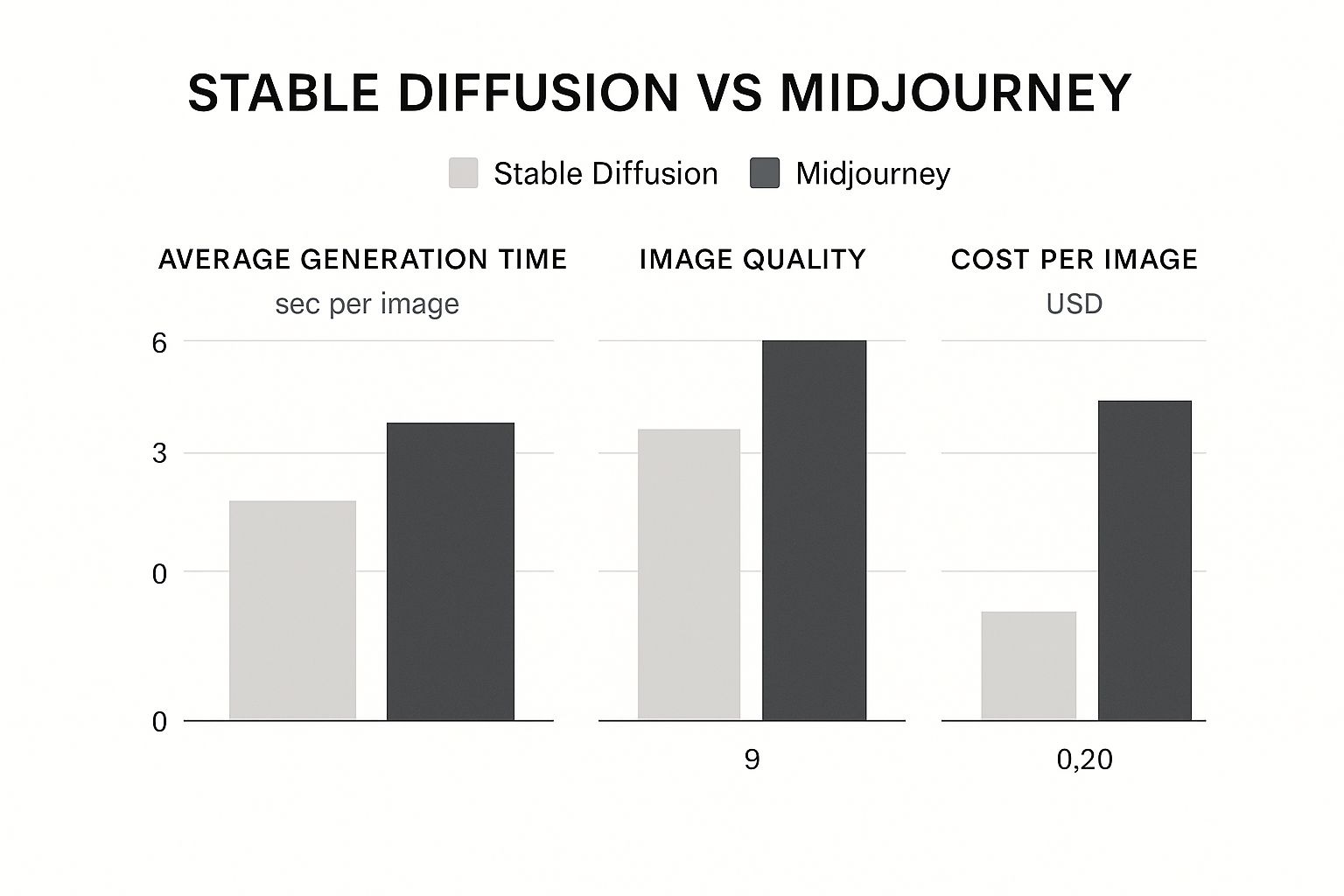
This data shows a clear trade-off: Midjourney shines in out-of-the-box quality and speed, but Stable Diffusion offers a lower potential cost per image if you're willing to handle the technical side.
The Second Test: Diving into Fantasy
Okay, so what about when we leave reality behind entirely? Moving into pure imagination is where the built-in artistic biases of each model really start to show.
The Prompt: ethereal city floating in the clouds, architecture made of bioluminescent crystal, nebula in the background, fantasy art, matte painting
Midjourney's Approach: Midjourney was practically built for this. It leans heavily on its extensive training with fantasy and concept art, producing something that feels coherent, grand, and epic. The crystal buildings have a consistent, otherworldly glow, and the whole composition feels balanced and intentional—like it was made by a professional artist at a major game studio. It’s fantastic at creating a sense of awe.
Stable Diffusion's Approach: The results here can be more of a mixed bag. Without a specialized fantasy model or a super-detailed prompt, Stable Diffusion might struggle to make a "city made of crystal" feel cohesive. Some buildings might look like glass, others more like glowing rocks. It often needs more specific instructions, like using LoRAs or refining the prompt with negative keywords, to achieve the same level of artistic consistency. It’s a powerful tool, but mastering it takes practice. For more on this, check out our guide on how to write AI prompts that give the model the direction it needs.
Prompt vs Output Side-by-Side Comparison
To really see the difference, let’s put these prompts side-by-side. This table shows how each platform interpreted the exact same text, highlighting their unique strengths and weaknesses for different artistic styles.
| Prompt Theme | Prompt Text | Stable Diffusion Output Analysis | Midjourney Output Analysis |
|---|---|---|---|
| Photorealism | photograph of an old fisherman from Maine, weathered face, looking out at the sea, cinematic lighting, 8k, hyperrealistic |
The output is strikingly realistic but can be gritty and less polished. It focuses on the technical "photograph" aspect, capturing details literally. The result feels more like a documentary photo than a stylized portrait. | The image is immediately cinematic and aesthetically pleasing. Lighting is dramatic, composition is strong, and the "fisherman" has a heroic quality. It interprets the prompt through a highly artistic, "Hollywood" lens. |
| Fantasy Art | ethereal city floating in the clouds, architecture made of bioluminescent crystal, nebula in the background, fantasy art |
Results can be inconsistent without more guidance. The model might struggle to unify complex concepts like "bioluminescent crystal architecture." It requires more user input (like negative prompts or LoRAs) to create a cohesive, professional-looking scene. | The output is grand, coherent, and painterly, looking like polished concept art. The "bioluminescent crystal" has a consistent style, and the overall composition feels intentional and epic. It excels at creating a sense of scale and wonder effortlessly. |
This comparison makes it clear: the best tool really depends on the job at hand.
So, Who Wins on Image Quality and Style?
Ultimately, choosing between them comes down to your creative goals and how you like to work.
Choose Midjourney for: Getting beautiful, artistic images quickly. It’s fantastic for fantasy art, stunning portraits, and any style where a polished, opinionated aesthetic is what you want. It's a go-to for designers and artists who need to brainstorm and produce high-quality concepts fast.
Choose Stable Diffusion for: Total creative control. If you want literal interpretations, technical photorealism, or a neutral base image to edit yourself, it’s the clear winner. It's the better choice for creators who want to dictate every aspect of the style and avoid a heavy-handed AI aesthetic.
Breaking Down Cost And Platform Access

When it to comes to choosing between Stable Diffusion and Midjourney, your budget and how tech-savvy you are will be the biggest deciding factors. The two platforms couldn't be more different in their approach. Midjourney is a clean, straightforward subscription service, while Stable Diffusion is a sprawling ecosystem with options that swing from totally free to paid, high-end services.
Midjourney keeps it simple: you pay a monthly fee, you get to make images. There’s no free trial for generation, so you have to jump in with a subscription to get started. It’s a model that has worked out incredibly well for them.
Just how well? Midjourney's revenue has exploded since it launched in 2022. It shot from around $50 million that year to a projected $500 million by 2025—all without spending a dime on marketing. That meteoric rise is backed by a massive community, with its Discord server ballooning to over 21 million members. For a deeper dive into these numbers, check out this report on Midjourney statistics.
The Midjourney Subscription Model
Midjourney’s plans are all about GPU time, which is just a fancy way of saying how many images you can create at top speed.
- Basic Plan: For about $10/month, you get a set number of "Fast Hours," which is enough for roughly 200 generations. It's a great starting point if you're just dipping your toes in.
- Standard & Pro Plans: Starting at $30/month, these tiers give you more Fast Hours and, more importantly, unlock "Relax Mode." With Relax Mode, you can generate an unlimited number of images, they just take a bit longer to process. This is the sweet spot for heavy users who don't mind a short wait.
The real appeal here is predictability. You pay a flat fee and you know exactly what you’re getting. It’s perfect for budgeting creative work without any surprise costs or technical headaches.
The Stable Diffusion Access Ecosystem
Stable Diffusion is the wild west by comparison. Since it's open-source, how you access it—and what you pay—is all over the map. You can get it for free, or you can pay for cloud-based convenience.
Free Local Installation
If you’re technically inclined and have the right gear, this is the ultimate power-user setup. You can download Stable Diffusion and run it right on your own computer. It's completely free, gives you unlimited generations, and everything you create stays private on your machine.
But there’s a catch: hardware. You’ll need a decent graphics card (GPU) with at least 8 GB of VRAM to get a smooth experience with the standard models. If you want to use the newer, more powerful models like SDXL, you really need 12-16 GB of VRAM to avoid sluggish performance. That initial hardware cost can be a serious hurdle.
Pay-As-You-Go Cloud Platforms
Don't have a beastly PC? No problem. Cloud-based services are your best friend. Platforms like our own AI Photo HQ and others do all the heavy lifting for you, handling the complicated setup and maintenance.
With these services, you usually pay per image or for each minute of GPU time you use. It's the perfect middle ground for anyone who wants the raw power of Stable Diffusion without the upfront hardware investment, letting you scale your usage as needed.
Final Verdict And Use Case Recommendations
So, how do you choose between Midjourney and Stable Diffusion? There’s no simple winner. The right choice depends entirely on what you’re trying to accomplish—it’s a classic trade-off between getting polished, artistic results fast or having deep, granular control.
This isn’t just an academic debate. The AI image generator market is exploding and is on track to hit over USD 1.4 billion by 2032. These tools are quickly becoming standard issue in creative workflows everywhere. If you want to dig into the numbers, this AI image generator market report offers a great overview of the growth.
Choose Midjourney For Speed And Artistry
You should go with Midjourney if you're a designer, artist, or marketer who needs beautiful visuals without a steep learning curve. Its real magic lies in turning a simple prompt into something that looks professionally polished and aesthetically pleasing, right out of the box.
- Designers & Marketers: Midjourney is a lifesaver for whipping up mood boards, ad concepts, and social media graphics. You can generate stunning, high-quality images in seconds without ever touching a technical setting.
- Artists & Illustrators: When you need to break through a creative block or just brainstorm concepts, Midjourney is fantastic. Its "opinionated" style gives you a strong artistic foundation to start from.
Midjourney shines when the overall aesthetic is more important than a literal, pixel-perfect interpretation of your prompt. Think of it as an artistic collaborator that nudges your vision toward something beautiful.
Choose Stable Diffusion For Control And Customization
On the other hand, you should pick Stable Diffusion if you’re a developer, researcher, or any hands-on creator who needs total control. Its open-source DNA is its biggest advantage, letting you get under the hood and tinker.
- Developers & Researchers: The ability to train your own models, experiment with techniques like LoRAs, and hook into it via an API makes Stable Diffusion the only real option for deep, technical work.
- Technical Artists & Photographers: If you need to nail a specific pose using ControlNet, maintain flawless character consistency across images, or create a photorealistic render that isn't overtly "artistic," Stable Diffusion gives you the precision tools to do it.
The Hybrid Workflow: A Best-Of-Both-Worlds Approach
Here’s a secret from the pros: you don't have to pick a side. Many advanced users blend the two platforms to get the best of both.
- Ideation in Midjourney: Start by firing off dozens of concepts in Midjourney. It’s perfect for exploring different visual directions quickly thanks to its speed and artistic flair.
- Refinement in Stable Diffusion: Once you land on a concept you love, bring that image over to Stable Diffusion. Here, you can use tools like ControlNet to lock in the composition and inpainting to fix or change tiny details. It’s the ultimate combination of artistry and control.
Frequently Asked Questions
As you get deeper into the world of AI image generation, you're bound to have some questions, especially when weighing two giants like Stable Diffusion and Midjourney. Let's tackle some of the most common ones to help you figure out which platform is the right fit for you.
Can I Use Stable Diffusion Completely For Free?
Yes, you absolutely can. This is one of Stable Diffusion's biggest draws. Because the core software is open-source, you can download it and run it on your own computer without ever paying a subscription fee. That means unlimited image creation, totally on your own terms.
The catch, of course, is hardware. To get any real work done with modern models like SDXL, you need a decent graphics card (GPU). We're talking at least 8GB of VRAM, but honestly, you'll have a much better time with 12-16GB. If your PC isn't up to snuff, the "free" option becomes a lot less practical, and you'll likely need to use a paid cloud service instead.
What Are The Commercial Rights For My Midjourney Images?
If you're on any paid Midjourney plan, you own the images you generate. It's that simple. You can sell them, use them for marketing, put them on products—they're yours to use commercially. For professionals and businesses, this straightforward ownership is a huge plus.
The big thing to remember, though, is that AI-generated images typically can't be copyrighted in the traditional sense. So while you're free to use your creations, you might not have much legal protection if someone else decides to use them, too.
Which Tool Is Better For Creating Consistent Characters?
For a long time, Stable Diffusion was the clear winner here, thanks to its powerful ControlNet and LoRA extensions. But Midjourney has made huge strides and largely closed that gap with its Character Reference (--cref) feature.
Here’s how they stack up now:
- Midjourney: It’s now surprisingly effective and incredibly easy to use. Just feed it an image of your character, add the
--creftag, and it does a fantastic job of keeping their face and style consistent across new images. It’s the faster, more intuitive choice. - Stable Diffusion: This is still the platform for absolute precision. By combining LoRAs, ControlNet for locking in specific poses, and super-detailed prompts, you can achieve a level of technical control that Midjourney can't quite match. It’s more work, but it pays off if you need perfect replication.
Beyond just making pictures, AI tools are quickly evolving in other creative and technical fields, like AI code generation, which shows just how versatile this technology is becoming.
Ready to stop wondering and start creating? AI Photo HQ gives you the power of the latest Stable Diffusion XL engine through a simple, intuitive web interface. Generate stunning, high-quality images in seconds without any technical setup. Explore our plans today and bring your ideas to life.


