
Want to create an avatar free from a photo? It's surprisingly simple with an AI tool like AI Photo HQ. The entire process is designed to be user-friendly. This guide will provide a step-by-step tutorial, showing you exactly how to upload a photo, choose a style, and generate a unique avatar in just a few clicks.
Your Quick Guide to Creating a Free Avatar From a Photo
Turning a regular photo into a cool, eye-catching avatar is easier than you might think. You can forget about wrestling with complicated software—modern AI tools handle everything for you. This guide will walk you through the practical steps, so you can get started right away.
The secret to a fantastic AI avatar is a fantastic source photo. The AI needs clear information to do its best work. A well-lit, high-resolution shot where your face is front and center is the perfect starting point. Avoid photos with harsh shadows, blurry focus, or busy backgrounds, as these can confuse the AI.
Step 1: Select the Perfect Photo
Before you even visit an AI avatar creator, the first step is to choose the right picture. A simple headshot taken against a plain wall will almost always work better than a group photo from a dimly lit concert. The goal is to give the AI as much clean data about your facial features as possible.
If you want to touch up your photos before you start, there are plenty of great AI tools for photo editing that can help you nail the lighting or crop your picture perfectly.
To help you pick the best possible picture from your camera roll, follow these specific guidelines. Sticking to these recommendations is the single best thing you can do to boost the quality of your final avatar.
Photo Guidelines for the Best AI Avatar Results
Follow these tips to ensure your source photo helps the AI generate a high-quality and accurate avatar.
| Photo Characteristic | Why It's Important | Quick Tip |
|---|---|---|
| Good Lighting | Even, natural light shows off your facial features clearly and prevents weird shadows. | Face a window during the daytime for soft, flattering light. |
| Simple Background | A neutral, uncluttered background helps the AI focus only on your face, without any distractions. | Stand in front of a plain wall or use your phone’s portrait mode to blur the background. |
| Clear View of Face | Your face shouldn't be covered by hair, hands, or accessories like sunglasses. | Push your hair back and take off any hats or large glasses before snapping the photo. |
| Neutral Expression | A calm, neutral look or a gentle smile gives the AI a versatile base to work with for different avatar styles. | Relax your face and look right into the camera, almost like you're taking a passport photo. |
Nailing the source photo is half the battle. Once you have a great picture, the rest of the process is smooth sailing.
Why AI Avatars Are More Than Just a Profile Picture
AI-generated avatars have evolved far beyond being just a fun gimmick. These days, they're a legitimate tool for carving out a unique digital identity, protecting your privacy, and just getting creative with how you show up online. For a lot of people, an avatar becomes their digital twin.
This whole movement is really a response to our growing need for personalized content online. It doesn't matter if you're a streamer, a professional trying to network on LinkedIn, or a gamer building a community—a custom avatar helps you get noticed in a very crowded, very visual space.
Building Your Digital Brand
Think about it: your avatar is often the very first thing people see. It’s a visual handshake that can say a lot about your personality or professional vibe before anyone even reads your bio. That makes it a crucial piece of the puzzle for anyone trying to build a memorable online presence.
A gamer, for instance, might go for a high-energy, stylized avatar that matches their streaming persona. A business consultant, on the other hand, would probably want something more polished and professional. It’s all about matching your visual identity to your goals.
- For Professionals: A clean, studio-quality avatar on LinkedIn can make you seem both expert and approachable.
- For Creators: An artistic or cartoonish look helps build a brand that’s instantly recognizable across YouTube, Instagram, and TikTok.
- For Gamers: Fantasy or cyberpunk themes are perfect for creating an immersive identity that connects with communities on Discord and Twitch.
The Business of Digital Identity
The growing importance of a digital identity isn't just a feeling; the numbers back it up. The AI avatar market is projected to hit around $527.58 billion by 2030. That’s a massive global shift in how we represent ourselves, driven by the demand for digital personas that can engage audiences anywhere.
This isn't just for personal fun anymore. Companies and serious creators are now using hyper-realistic avatars to boost engagement, deliver content, and lock down their branding in a competitive market.
Beyond just personal branding, businesses are finding all sorts of ways to use artificial intelligence to work smarter. You can find a lot of affordable AI tools out there that boost productivity. When you create an avatar free from a photo, you're tapping into that same powerful trend to take control of your own digital story.
A Practical Walkthrough Using an AI Avatar Creator
Alright, let's get our hands dirty and walk through the exact steps to create an avatar free from a photo. We'll use a platform like AI Photo HQ as our example so you can see how it works from start to finish.
Step 1: Upload Your Photo
Navigate to the avatar creation tool. You'll see an upload button—click it and select the high-quality headshot you prepared earlier.
Step 2: Frame Your Image
Once uploaded, a cropping tool will likely appear. Adjust the frame to ensure your face is centered and clearly visible. This step is crucial for the AI to focus on the right features.
Step 3: Confirm and Process
After you've framed your photo perfectly, hit the "confirm" or "generate" button. The AI will now begin analyzing your image.
This little infographic lays out the simple three-step flow to get your photo ready for its big transformation.
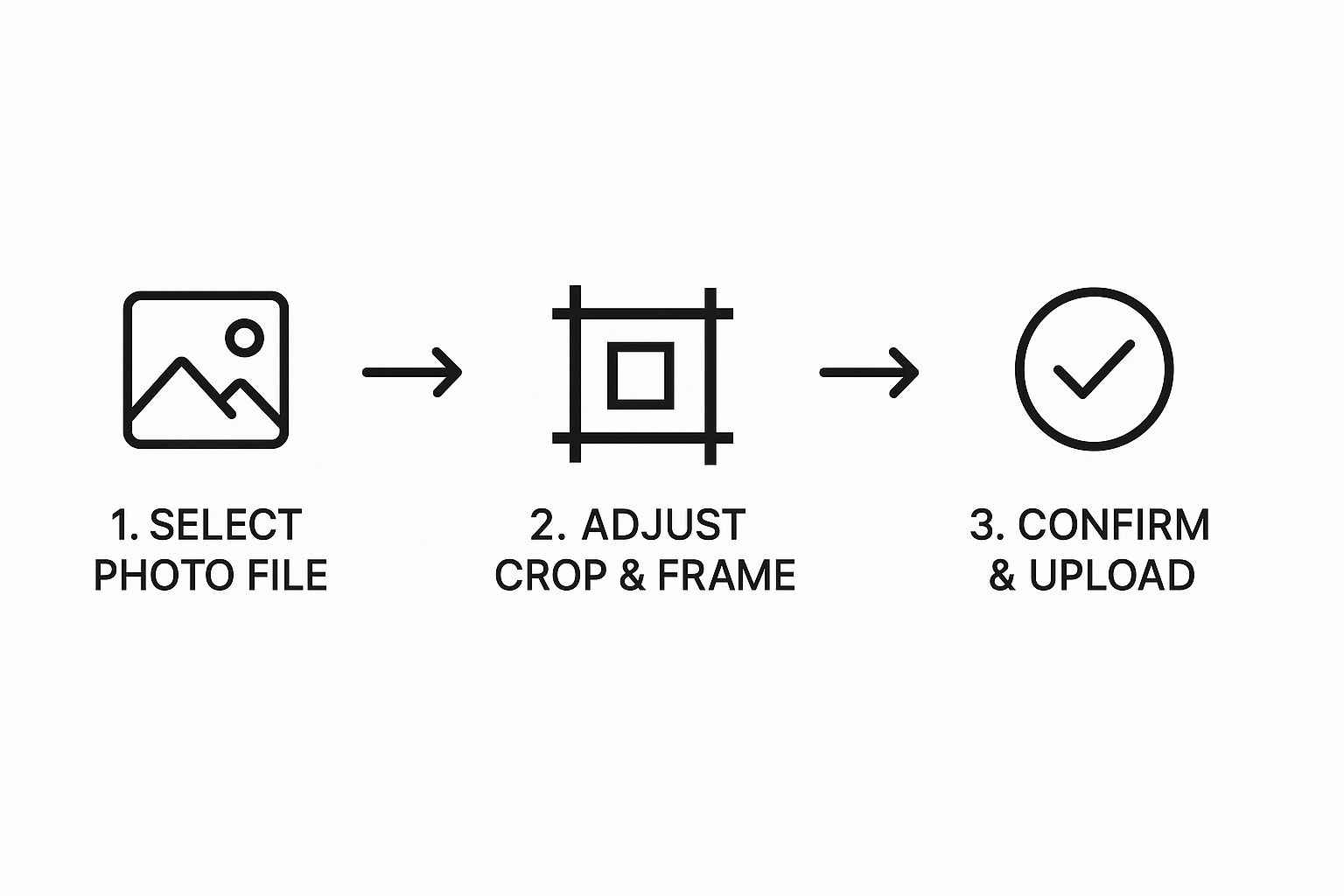
As you can see, the initial part is a breeze. It’s all about selecting your image, making sure it’s framed well, and hitting confirm before the AI works its magic.
Step 4: Explore The Style Library
Once your photo is uploaded, we get to the fun part: the style library. This is where you transform your headshot. You'll find a gallery of options, often grouped into categories.
- To create a professional avatar: Look for styles labeled 'Studio', 'Corporate', or 'Photorealistic'. Click on one of these to generate a polished image suitable for LinkedIn.
- To create a gaming avatar: Navigate to categories like 'Fantasy' or 'Sci-Fi'. Select a style like 'Cyberpunk' or 'Epic Hero' to get a look that fits Twitch or Discord.
- To create a fun, artistic avatar: Browse categories like 'Artistic' or 'Cartoon'. Choose a 'Comic Book' or 'Anime' style for a creative profile picture for Instagram or X.
Choosing a style is as simple as clicking on the one you like. The AI then immediately starts applying that aesthetic to your face. If you're curious about the tech behind how AI reinterprets images, our guide on using an AI art generator from a photo dives a bit deeper.
Step 5: Preview and Download Your Creation
After a few moments, the tool will show you a preview of your new avatar. Most platforms, AI Photo HQ included, let you see the final result before you commit to downloading it.
My pro tip: Don't be afraid to play around! The same photo can look wildly different depending on the style. I always recommend running your picture through a few of your favorites to see which one really nails the look you're going for.
If you love the result, the final step is to click the 'Download' button. The free version typically provides a file that’s perfectly sized for social media profiles. And for those interested in taking this a step further, some resources offer a detailed guide on creating AI influencers.
Once downloaded, your new avatar is ready to be uploaded to all your digital platforms.
How to Choose an Avatar Style That Fits Your Goal
So, you've used a photo to create a free avatar, and now you're faced with a sea of style options. It's easy to get lost. The trick is to think beyond what just looks cool and consider what you’re trying to achieve. Your avatar is your digital handshake, so its vibe should match your intentions.
A polished 'Studio' style, for example, is a no-brainer for a professional hub like LinkedIn. It gives off a clean, competent feel that helps you make a solid first impression on recruiters or potential clients.
On the flip side, something more vibrant like a 'Cartoon' or 'Anime' style is perfect for creative, community-driven spaces. If you spend your time on Twitch, Discord, or even TikTok, these styles are far more engaging and show off your personality.
Matching Your Style to Your Platform: A Quick Tutorial
It all comes down to context. The avatar that crushes it on your gaming profile probably won't land the same way in your work email signature. Here’s a quick breakdown of how to choose:
- Goal: Professional Networking (LinkedIn, business sites):
- Action: Select styles like 'Studio', 'Corporate', or 'Photorealistic'.
- Result: You'll get an avatar that signals expertise and a serious approach.
- Goal: Showcasing Creativity (Instagram, ArtStation):
- Action: Experiment with 'Digital Painting', 'Fantasy', or 'Watercolor' styles.
- Result: Your avatar will highlight your artistic flair and make your profile stand out.
- Goal: Social & Gaming (Discord, Twitch, X):
- Action: Go bold. Choose looks like 'Cyberpunk', 'Comic Book', or 'Pop Art'.
- Result: You'll build a memorable persona that connects with your community.
The world of AI image generation is moving fast. By 2025, the tools that create avatars from photos will be offering an insane amount of choice. Yet, as the demand for this kind of personalization grows, 55% of organizations admit they have limited generative AI expertise. This is a huge opportunity for anyone willing to get in and master these tools.
The goal is to create a digital identity that feels both authentic to you and appropriate for the space you're in. It's about being intentional.
This idea of adapting an image's aesthetic is a core concept in AI called style transfer. It's a fascinating field, and we dive deeper into it in our guide on understanding AI image style transfer. When you choose your style carefully, your avatar becomes more than just a picture—it becomes a strategic part of how you present yourself online.
Getting a Lifelike Avatar Without the Uncanny Valley
When you want to create an avatar free from a photo that looks shockingly real, the big hurdle is the "uncanny valley"—that slightly creepy feeling you get when something looks almost human.
Thankfully, modern AI has gotten incredibly good at jumping right over that valley, largely thanks to Generative Adversarial Networks (GANs). Think of it as two AIs working together: one creates a realistic face, while a second "critic" AI points out every tiny flaw until the image is virtually indistinguishable from a real photograph.
How to Prep Your Photo for Realistic Results
The realism of your final avatar is a direct reflection of the photo you start with. To get the best photorealistic results, follow this simple pre-upload checklist:
- Step 1: Check Your Lighting. Before taking your photo, find soft, even light. Harsh shadows are the enemy. A simple trick is to face a window during the daytime for perfect, natural illumination.
- Step 2: Use a High-Resolution Image. A high-resolution photo gives the AI more data to analyze. This helps it capture fine details like skin texture and individual strands of hair, which are crucial for realism.
- Step 3: Keep Your Expression Natural. A massive, cheesy grin can sometimes confuse the AI. For a more versatile and realistic base, aim for a slight, subtle smile or a completely neutral expression.
By 2025, the tech behind photorealistic avatars had matured to an incredible degree, all thanks to these kinds of AI advancements. They can now replicate tiny details like the reflections in your eyes and subtle expressions. You can actually read the full story of this AI evolution on heygen.com to get a deeper look under the hood.
Common Questions About Creating Avatars From Photos
So you've just turned your favorite photo into an awesome new avatar. That's great! But it's totally normal to have a few questions, especially since AI image generation is pretty new territory for a lot of people. Let's walk through some of the most common things people wonder about so you can use your new digital look with confidence.
Probably the first thing on your mind is the price tag. When you see the word "free," it’s smart to be a little skeptical.
Are These AI Avatar Tools Genuinely Free to Use?
For the most part, yes. Many of the best AI tools out there offer a free plan that's more than enough for the average person. You'll typically get access to a good range of styles and a certain number of free downloads without paying a dime.
Of course, some platforms keep their most advanced styles or super high-resolution downloads behind a paywall. But the core feature—turning your photo into a slick, high-quality avatar—is often completely free to use.
Next up is a big one: privacy. What on earth happens to your photo after you upload it?
Reputable avatar makers take user privacy seriously. Your photo is really only needed for the few seconds it takes to process and create your avatar. Most services are very clear in their privacy policies that they don’t hang onto user photos long-term or use them to train their AI models unless you specifically say it's okay. Still, it's always a good habit to quickly scan the privacy policy of any tool you're using.
One area that trips a lot of people up is usage rights. Just because you made the avatar doesn't mean you can use it for absolutely anything. You've got to check the fine print.
Can I Use My AI Avatar for Commercial Projects?
This is a make-or-break question if you're a content creator, run a business, or have a monetized YouTube channel. The answer really comes down to the specific terms of service for the tool you used.
A lot of free avatar generators will state that the images are for personal, non-commercial use only. If you're planning to use that avatar on your business website, in marketing materials, or for anything that makes money, you need to double-check the licensing agreement. In most cases, you'll find that commercial rights are part of a paid or premium plan.
Ready to jump in and create your next stunning avatar with zero guesswork? AI Photo HQ makes it incredibly simple to generate unique, high-quality avatars from your photos in seconds. Start creating for free today!


